AI Helped You Build Fast. Here's How It Can Hurt Your App's Growth Later
AI coding can help founders build fast, but the codebase can become harder to understand, test, and safely change as the app grows.
Short Answer
AI coding can hurt app growth when it creates more code than the founder can understand, test, and safely change. Tools like Lovable, Cursor, Claude Code, Bolt, Replit, and Codex are useful for building fast, but they often work from limited context. As the app grows, AI-generated fixes can create side effects, duplicated logic, scalability problems, and repeated bug loops that make the product harder to improve.
The First Warning Sign Usually Feels Small
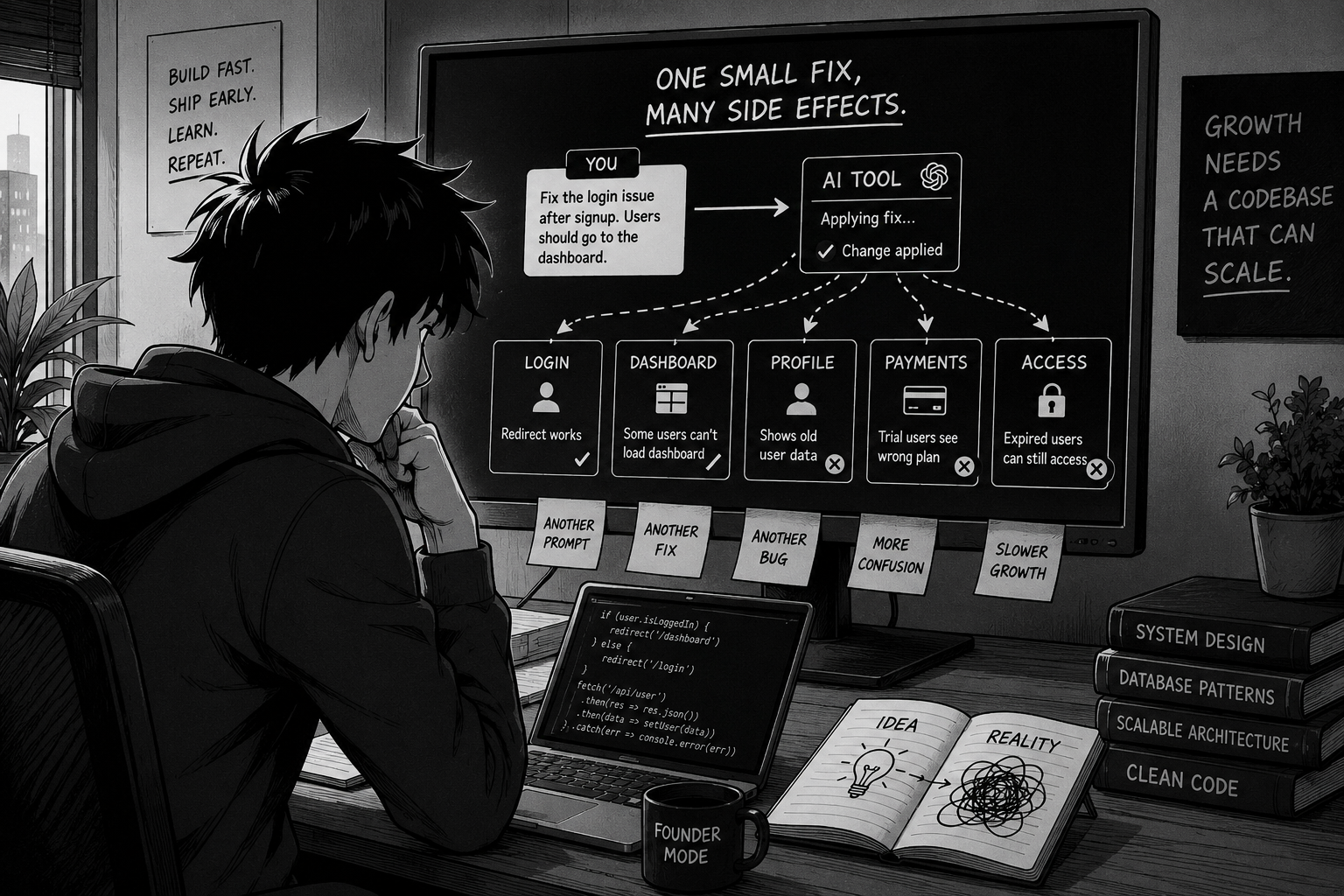
A founder asks Lovable to fix one small bug.
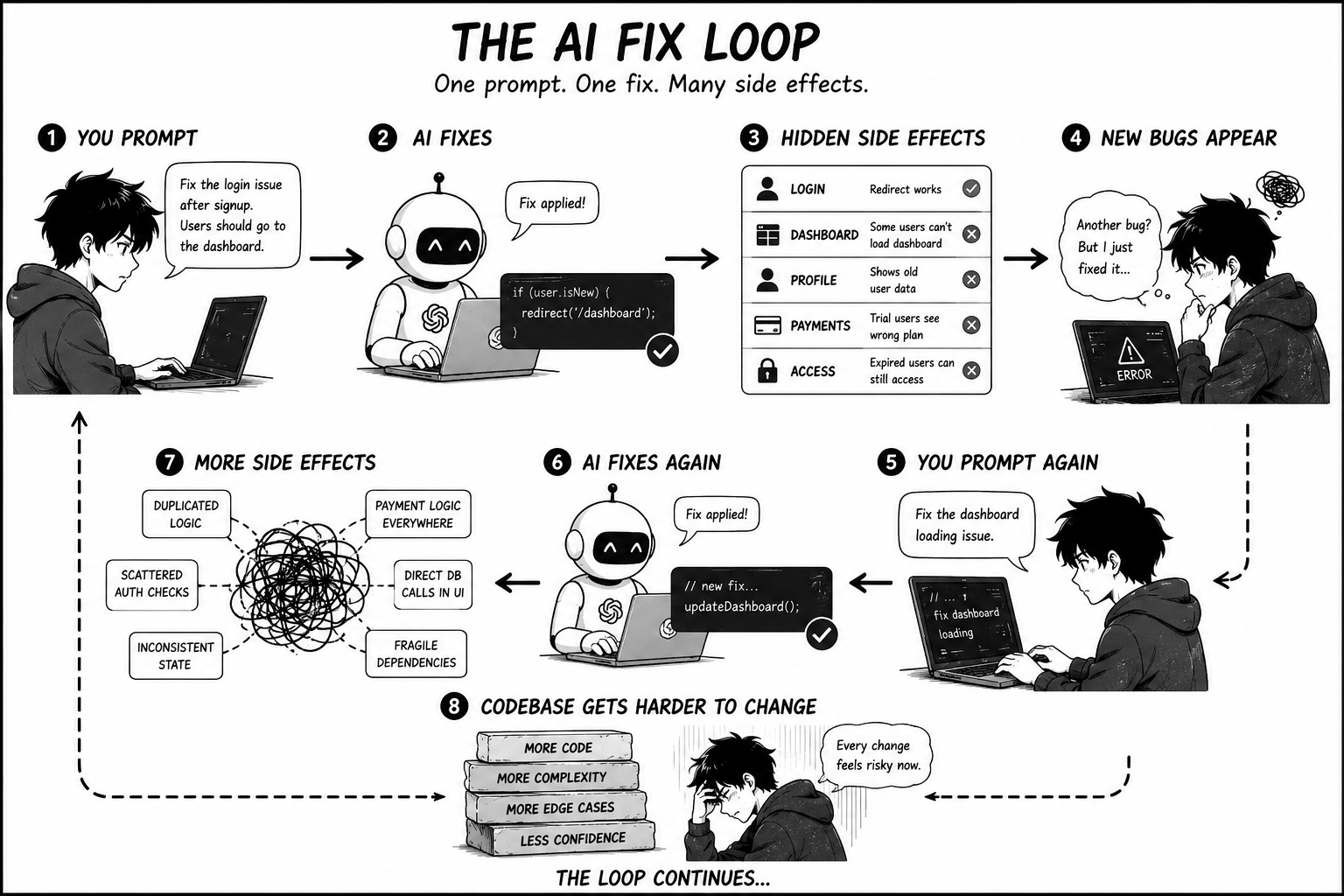
The login redirect is broken. After signup, users are landing on the wrong page, so the founder writes: "Fix the login issue after signup. Users should go to the dashboard."
The AI makes a change. The redirect works. For a moment, it feels solved. Then the dashboard stops loading for some users.
So the founder opens Cursor or Claude Code and asks for another fix. The dashboard starts loading again, but now the profile page shows old user data. Another prompt gets written. Another fix gets applied. Another part of the app changes.
This is the point where many founders start to feel something uncomfortable. They are still using AI. They are still changing code. But they are no longer building with confidence. They are chasing side effects.
The problem is not that AI made one mistake. Mistakes happen in normal software development too. The deeper problem is that the founder often does not know what changed, why it changed, what else depends on that change, or whether the new fix made the codebase healthier or more fragile.
That is how AI coding can quietly start hurting app growth.
How AI Coding Tools Actually Work
AI coding tools generate code from the context they are given. They read your prompt, inspect the files or project context they can access, and produce a likely solution based on patterns they have learned from other code.
That is why they feel so powerful in the beginning. You describe a screen, a button, a database field, a payment flow, or a bug, and the tool gives you something that looks real. For early prototypes, this is genuinely useful. It helps founders turn an idea into a working app much faster than before.
But AI does not automatically understand your product the way a human engineer does after spending time inside the codebase. It may not know why a previous decision was made, which helper functions are shared across screens, or how one database field affects onboarding, billing, admin access, and user permissions.
So when you ask AI to "fix the bug," it may fix the bug you described. But real engineering is not only about making the current error disappear. It is about understanding the system around the error, checking what else the fix touches, and deciding whether the fix solves the root problem or just covers the symptom.
That difference becomes more important as the app grows.
The Missing Prompt Problem
One of the biggest causes of AI-generated code problems is not always a bad prompt. It is a missing prompt.
A founder might write: "Add a subscription check before users can access this page."
That sounds clear. But an engineer would immediately see missing decisions. Where is subscription status stored? Is there a free trial? What happens when the trial expires? Should the check happen on the frontend, the backend, or both? Should users see a popup, a disabled button, a redirect, or a paywall screen?
A founder may not include these details because they may not know those details matter. That is normal. The founder is trying to describe the product behavior, not design the whole architecture.
The AI may still make a decision and write code. Maybe it adds a subscription check directly inside one page. Later, another prompt adds a slightly different check inside another screen. Then another prompt adds backend logic. After a few rounds, the app has multiple ways of deciding whether a user is subscribed.
At first, this may not be obvious. Then real users arrive. One paid user gets blocked. One expired user gets through. One trial user sees the wrong button. The founder asks AI to fix each issue separately, and the codebase gets another layer of patches.
This is how missing prompts break things. Not because the founder is careless, but because AI coding requires context the founder may not know they need to provide.
Why Side Effects Increase as the Codebase Grows
A side effect is when a change fixes one thing but accidentally changes something else.
In a small prototype, side effects are easier to notice. There are fewer screens, fewer states, fewer users, and fewer places where one piece of logic can be reused. As the app grows, side effects become harder to predict. The same login state may affect onboarding, billing, account settings, feature access, and notifications. The same database field may be read by the mobile app, a web dashboard, and a backend function.
This is why AI app bug fixing becomes more frustrating over time. You ask Cursor to fix checkout, and trial users suddenly see the wrong plan. You ask Claude Code to fix the trial button, and expired users can still access a page. You ask Codex to clean up one function, and another feature depended on the old behavior.
The amount of possible side effects grows with the size of the app. More files means more places to accidentally touch. More features means more hidden dependencies. More user states means more edge cases. More previous AI-generated code means more decisions nobody fully remembers.
That is why "just prompt it again" becomes less reliable as the product grows.
Scalability Problems Start Before You Have Scale
When founders hear "scalability problems," they usually think about traffic. Can the server handle more users? Can the database handle more reads? Will the app load fast enough?
Those things matter, but AI-built apps often run into a different kind of scalability problem first: the codebase itself does not scale.
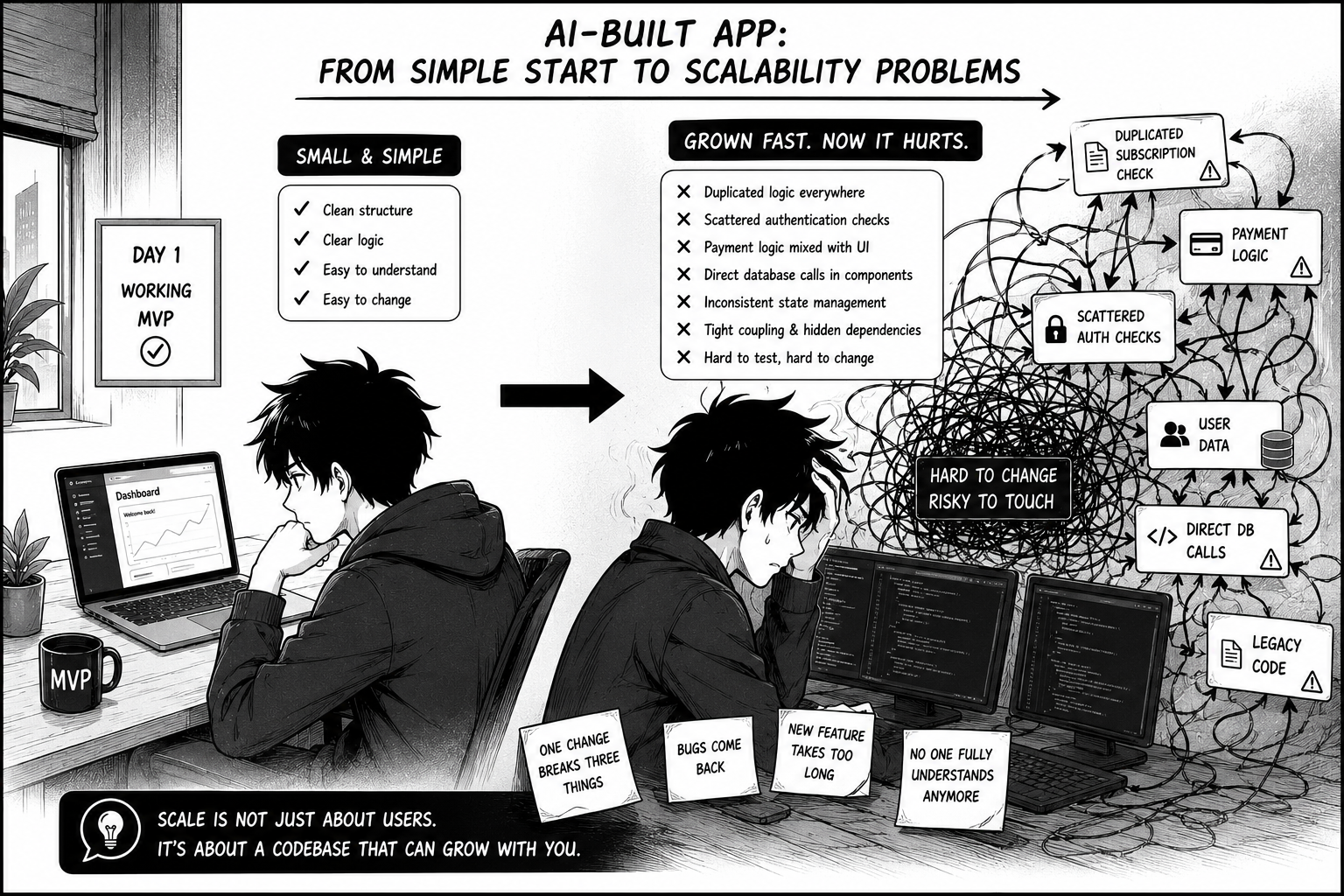
A prototype can survive messy structure. A real product cannot keep growing on top of duplicated logic, scattered state, unclear data models, and random patches. The app may still work in a demo, but every new feature becomes more fragile.
The same subscription logic might be copied into several screens instead of living in one clear place. Database calls might happen directly inside UI components. Payment logic might be mixed with button logic. Authentication checks might be scattered across the app.
None of this always breaks the first version. That is why it is easy to miss. The app opens. The buttons work. The demo looks good.
But the moment you try to add more, the structure starts pushing back. A new pricing plan conflicts with the old payment setup. A new dashboard needs data that was never organized properly. A new user role does not fit the existing permission logic. A small bug fix touches five unrelated files.
That is a scalability problem even if the app does not have many users yet.
How This Slows Growth
AI codebase problems hurt growth because they change how the founder makes product decisions.
At first, the founder is asking, "What should I build next?" Later, the question becomes, "What can I touch without breaking something?"
That shift is expensive. You may delay a better onboarding flow because login is fragile. You may avoid improving pricing because subscription logic is messy. You may postpone a new feature because the last feature broke three unrelated things. You may stop testing growth ideas because the codebase feels unpredictable.
This is one of the most damaging parts of messy AI-generated code. The app does not only become harder to maintain. It starts shaping the business. The founder works around the codebase instead of building on top of it.
Growth needs iteration. You need to test, adjust, remove, improve, and ship. If every change creates a bug loop, the app slows down even if the founder is still working every day.
AI Is Useful. Losing Control Is the Real Problem.
The point is not that AI coding is bad. AI has helped many founders build things they could not have built otherwise. It can be a powerful way to prototype, test ideas, create demos, and get early feedback.
The problem starts when the app keeps growing but the founder's understanding does not grow with it.
A founder does not need to become a senior engineer overnight. But they do need enough control to understand the important parts of the product. Where does login happen? Where is subscription logic enforced? What controls onboarding? What talks to the database? What is duplicated? What is fragile? What should not be touched casually by another prompt?
AI is useful for speed. Human engineering judgment is useful for control.
Where AICodebaseRescue Fits
This is the kind of moment AICodebaseRescue is built for.
AICodebaseRescue is not an automated scanner, SaaS tool, or magic AI platform. It is a hands-on founder-engineer service by Mert Akanay for founders who built quickly with AI tools and now need help getting control back.
The work is practical: open the repo, find the real problems, separate symptoms from root causes, explain the codebase in plain English, identify risky areas, fix bugs that keep returning, and create a clear path for what should be repaired before more features are added.
The point is not to shame founders for using AI. Most founders used AI because it helped them move, and moving matters. The point is to make sure the app does not become trapped by the same code that helped it get started.
AI helped you build fast. Now the next step is understanding what you built well enough to keep growing.
Short FAQ
Yes. AI coding can hurt app growth when it creates hidden side effects, duplicated logic, fragile structure, scalability problems, or repeated bug loops. AI is useful for building quickly, but if the founder does not understand what was generated or changed, the codebase can become harder to grow over time.
Final Thought
The first version of an AI-built app can feel exciting because it turns an idea into something real. That is a meaningful step. A working prototype gives a founder energy, proof, and something to show.
But growth asks more from a codebase than a prototype does. Growth brings more users, more edge cases, more features, more payments, more data, and more decisions. The code has to survive change.
AI can still be part of that process. The goal is not to stop using it. The goal is to stop letting every new prompt add more confusion than clarity.
A growing app needs more than generated code. It needs control over what has been built, why it works, where it is fragile, and what should be fixed before the next feature is added.